Business concept
Document the business idea, market, competition, organisation, objectives, risks and founder information systematically.
Automate your finance processes with electronic invoices and say goodbye to audit stress, manual data entry, and scanners. MyRecruit.App automatically handles everything the GoBD require for document archiving in the background.
MyRecruit.App creates a business plan suitable for banks and public authorities and connects the business concept, scenarios and financial planning with subsequent sales and finance processes.
Document the business idea, market, competition, organisation, objectives, risks and founder information systematically.
Compare base, optimistic and conservative assumptions across revenue, costs, investments and financing.
Calculate profitability, liquidity, capital requirements and financing monthly and consolidate them by year.
MyRecruit.App is aimed at sole proprietors and small businesses that have their accounting handled by a tax advisor. Since 2025, companies of every size have already been required to be able to receive and process e-invoices.
With MyRecruit.App, you can digitize your finance processes today. Along the way, the system meets the GoBD requirements for audit-proof archiving in the background – fully automatically.
Your e-invoice reaches you by email, as a download from a customer portal, or via Peppol – the EU network for secure document exchange. It can arrive as an XRechnung (XML) or ZUGFeRD (PDF with embedded XML).
%{brand} automatically reads out the invoice data, creates an entry in cost management, and archives the original in a GoBD-compliant manner in AWS S3 storage. The system recognizes a plain PDF without an embedded XRechnung and offers you a form for manual entry.
You review the extracted data in a form and correct it if needed – no more scanning, no more manual entry. In the BWA (business analysis report), you forward all of a month's invoices to your tax advisor with a single click.
Large companies will be required to send electronic invoices starting in 2027, small companies from 2028. With MyRecruit.App, you can already do it today. Your revenue entries form the data basis for invoice creation.
Choose the customer, contact, billing address, service period, and invoice date. Assign the revenue to a category and record the line items with quantity, price, and VAT rate.
Download the finished e-invoice as a PDF and optionally check with an XRechnung viewer whether the embedded XML file matches the visible data. Optionally assign the revenue to a profit center.
Once finalized, the e-invoice can no longer be changed. %{brand} automatically archives it in a GoBD-compliant manner in AWS S3 storage. You then send it to your customer by email or via Peppol.
Not every business expense starts with a supplier invoice. MyRecruit.App therefore also records business entertainment expenses and one-time or recurring internal expenses in one consistent, traceable process.
Record the tax-relevant details together with the hospitality receipt and keep the entire transaction traceable in one place.
Capture fees, allocations, flat charges and other operating expenses even when no standard supplier invoice is available.
Define rules for regularly recurring expenses and use them to generate due internal expense entries in a controlled process.
Every e-invoicing platform improves efficiency. However, a platform that operates in isolation from revenue, cost, and document management loses most of these advantages – through high IT integration effort or permanent manual data transfer.
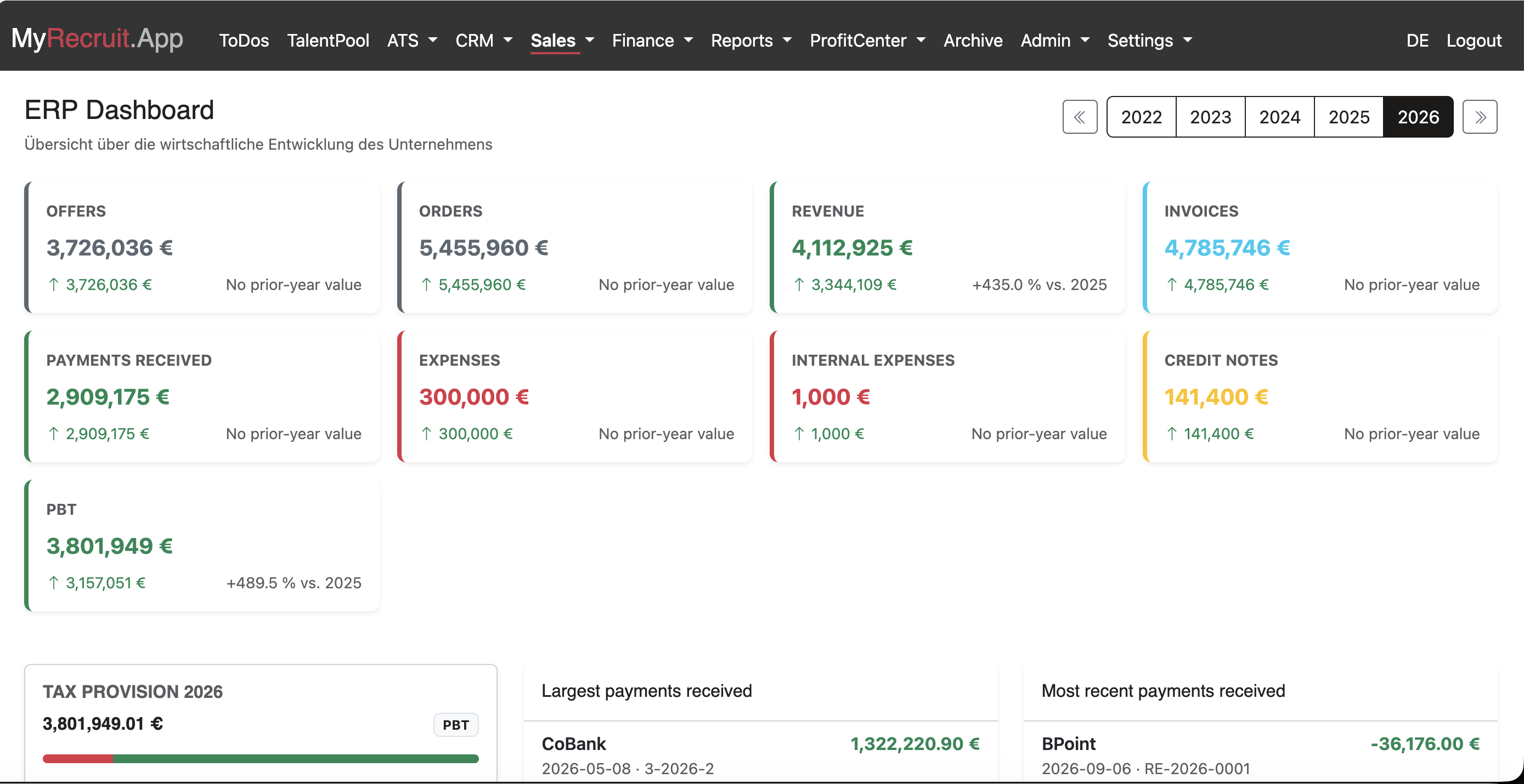
That's why MyRecruit.App goes a step further: it is a complete business and document management system with an integrated xRM/CRM, in which creating, sending, receiving and processing e-invoices is only one part of the functionality. The business management functions take on the role of an ERP system tailored to small and micro businesses – specifically for finance. The scope covers quotes, orders and order confirmations as well as revenue, invoices, e-invoices, credit notes, payments, reminders, business entertainment expenses, one-time and recurring internal expenses, and reporting functions such as management accounts and cash flow. You can assign costs and revenue to profit centers, for example for commission statements.

Maximum legal certainty without you having to do anything. Everything you create or upload is archived in an immutable, audit-proof, tamper-protected way. New versions are permitted – MyRecruit.App automatically logs the time, author, and version of every change.
Perfect traceability, logged automatically. Every creation or change to a revenue, credit note, or cost item is recorded with a timestamp and author. Since tax-relevant emails must also be documented under the GoBD, MyRecruit.App automatically archives every outgoing email in the email log.
With MyRecruit.App, you can create your business plan free of charge. You can also use recruiting and business management within clear free limits and without an expiring trial period.
Capture your business concept, founder information, scenarios and financial planning, then export the complete plan as a PDF for banks or public authorities.
Manage up to 100 candidates. Positions and applications are not limited separately. Business management includes five new orders per calendar year.
Store documents, including their versions, up to a total of 1 GB. Mandatory records generated automatically for an existing transaction continue to be archived.
Only when your needs exceed these free limits do you decide whether to enter into a SaaS Agreement. No fees arise without your express agreement.
No credit card required. The free account has no fixed expiry date.
Select the business partner and record the commercial purpose. The business transaction connects every subsequent step and document.
Use customer, product and service data, add quantities, prices and tax rates, and create the quote.
When the quote is accepted, it becomes an order. Items, amounts and business partner data are transferred automatically.
Mark the order as delivered. The related revenue is created without entering the order data again.
Create the invoice from the revenue. Address, services, amounts and tax information are carried forward, and the invoice document is archived automatically.
Record incoming invoices, internal and recurring expenses and business entertainment, then analyze revenue, costs, liquidity and results in reporting.